


Have you ever stumbled across an exciting video and wondered where it came from?
If so, you’ll be pleased to know that there are many ways to find a video source through reverse video searches.
This guide teaches how to conduct a reverse video search and why it’s useful.
What Is A Reverse Video Search?
Many people use search engines to find information by searching for a particular word or phrase (i.e., “keywords”) until the search engine reveals a page, video, or another piece of content that matches the search.
A reverse search, however, involves entering the piece of content (typically, a video or image) and finding each webpage on which the piece of content appears.
Thus, an RVS (reverse video search) involves imputing a video into the search engine and discovering the source of that video on the web.
How Reverse Video Search Works
Search engines, like Google, can interpret the color and pixels in a video and then find similar (or exact) videos on the web.
This will often reveal the original source of the video and any other instances of the video online.
However, this process is not always 100% accurate.
If a single pixel in the video has changed, it might not appear in the search results.
Plus, a high number of videos are uploaded to the web every day, so this process requires search engines to effectively index all videos to surface them in the search results.
Reasons To Use Reverse Video Search
There are a few reasons one might want to use reverse video search. Here are the most common use cases:
Find The Source Of A Video
Most often, a reverse video search is used to find the source of a video.
Say you find a funny or valuable video online. You might want to know who published the video, whether other content (like a blog article) is connected to the video, or whether the owner produces similar content.
A reverse video search, in this instance, may be able to find the original source of the content.
Find Duplicate Videos
If you are a video producer, you might want to use a reverse video search to see if anyone has copied or reproduced one of your original videos.
A reverse video search can help you find illegitimate uses of your content, after which you can contact the owner and ask for credit or for the video to be taken down.
Find The Full Version Of A Video Clip
Sometimes you might come across an interesting video clip and want to find the rest of the video.
A reverse video search might be able to interpret the video clip and find the full video online.
Find Related Content
A reverse video search may also be able to help you discover content that’s related to the video.
It might surface similar videos or related content (like articles, web pages, or blog posts) that featured the video.
This can be a great way to find more interesting content.
How To Conduct A Reverse Video Search
There are many ways to conduct a reverse video search. It often requires using the search engine directly or a third-party tool to upload the image.
Here are the most effective methods for conducting a reverse video search.
Run A Reverse Video Search On Google
Google doesn’t offer a reverse search function specific to video, so you will need to take a screenshot of the video and then use the reverse image search function.
- Find a distinctive frame in the video (i.e., a section that seems unique from other videos and most likely to surface the same video online).
- Pause the video.
- Take a screenshot of the frame you wish to capture ( Shift-Command-4 on Apple/Mac or Ctrl + PrtScn on Windows).
- Save the screenshot.
- Navigate to Google Images and select the camera icon. Use the search by image option.
- Upload the screenshot.
- Google will return the search results for your screenshot (if available).
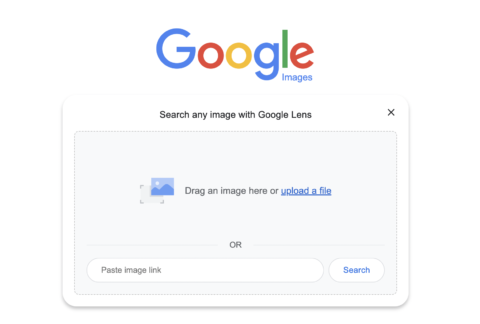 Screenshot of Google Images search engine, September 2022
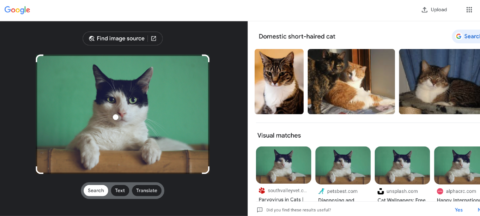 Screenshot of Google Images results for [domestic short-haired cat], Google, September 2022
Run A Reverse Video Search Using Berify
Berify.com is a reverse image and video search tool that matches your search to results from several search engines at once, including Google, Bing, Yandex, and others.
This may provide more complete results than using a single search engine.
Note: This freemium tool allows you to sign up for free, but will then charge a monthly subscription fee. So, use the free version if you only need a few searches.
Here’s how to use it:
- Take a screenshot of the video clip you want to search for.
- Visit Berify.com.
- Upload the screenshot to the search box that says Browse and upload the image here.
- Click Search.
- Berify will surface any results that match your search.
Run A Reverse Video Search Using Shutterstock
Shutterstock hosts a massive online database of over 1 billion images and videos. It can also be used to conduct a reverse video search.
- Take a screenshot of the video clip you want to search for.
- Visit Shutterstock.com.
- Navigate to the search box. Click on the camera icon (the Search by image function).
- Upload the screenshot. (Note: You can also specify whether you’re searching for certain vectors or whether illustrations in the video are animated/computer generated).
- Click the magnifying glass.
- Shutterstock will surface images or videos similar to your search.
Run A Reverse Video Search Using TinEye
TinEye is one of the leading “search by image” tools that allow you to find other images and videos that match your search.
TinEye uses computer vision, image recognition, and reverse image search technology.
- Take a screenshot of the video clip you want to search for or search for the video by URL.
- Visit TinEye.com.
- Find the search box. Click the Upload button to upload your screenshot, or simply drag and drop your image.
- Click the magnifying glass.
- TinEye will surface any images or videos that are similar to your search.
Run A Reverse Video Search on Bing
Like Google, Bing’s reverse video search function works best with a video screenshot. Running a reverse video search on Bing is simple:
- Take a screenshot of the video clip you want to search for.
- Open Bing’s Visual Search page.
- Upload the screenshot, drag and drop the screenshot, or paste the URL of the image or video in the search box.
- Bing will surface results for “related content” that closely matches the image or video.
Conducting A Reverse Image Search is Simple
Whether you’re trying to track down the source of a funny video or find similar content to suit your interests, a reverse video search can be a helpful tool for anyone.
Google, Bing, TinEye, and other tools offer reverse video search features that simplify finding a video’s origins.
Remember, reverse video search can help you find duplicate content, which could help you protect your digital assets. Or, it can help you find the original publisher of a video so you can give credit where it’s due.
Video is an excellent addition to many marketing campaigns, web content, social media strategy, and more. Use reverse video search to make finding, sourcing, and attributing videos more accessible than ever.
More resources:
Featured Image: Overearth/Shutterstock

