


The phrase “canonical tag” often comes up in discussions around SEO, and likely more so when working with cross-functional partners like engineering, analytics, etc.
At first glance, it might seem a bit intimidating, especially if you are newer to the SEO space.
Great news, though: With this guide, we will walk through the fine print around what a canonical tag is, why they matter, what they look like in the wild, where they belong, and some nitty-gritty details.
What Is A Canonical?
First and foremost, before we even define a canonical tag, if there is one piece of information you take from this guide, let it be this: Canonical tags are not directives like Robots.txt file.
This means Google views canonical tags as a strong hint, but at the end of the day, it considers many signals and decides whether to honor them.
Now that we have the golden rule out of the way, let’s get into what it is!
The canonical tag came into play in 2009 as an HTML tag found in the source code to tell search engines which URL is the master version of a page. This can be leveraged to tell Google what page variation it should index for users.
A canonical tag is the HTML tag itself on a page, but the “canonical” – now, that’s a bit different.
There are two simple ways to define the canonical variations: a user-declared canonical and a Google-declared canonical.
- User-declared canonical: This is precisely what it says; it’s the canonical specified in the canonical tag.
- Google-declared canonical: This is the URL Google chooses to honor as the canonical.
If you have access to Google Search Console, you can leverage the URL Inspection Tool to see both of the above canonical types.
In an ideal state, they match – but what if they don’t? We will talk more about that next.
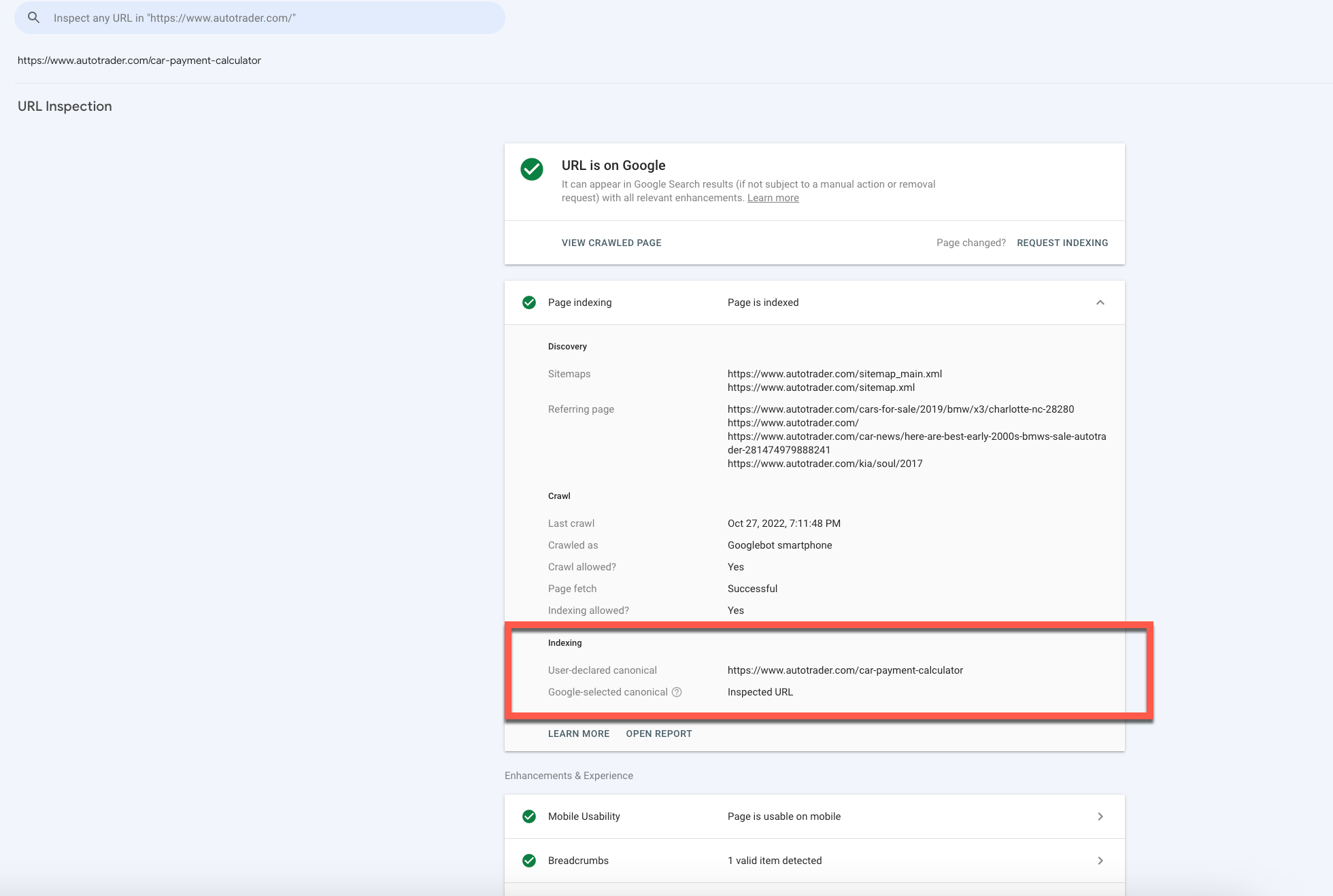 Screenshot from Google Search Console Inspect URL, October 2022
How Google Chooses A Canonical URL
When Google crawls and indexes a site, it reviews the primary content on the page. (Pro tip: Don’t confuse content as solely written content).
In this crawl, it will likely discover similar pages, and Google will then choose the page it feels is the best representation of what the page is trying to convey to users and select it as the canonical.
As we discussed above, a canonical tag is not a directive, so besides the canonical tag itself, Google considers other signals – so be consistent!
Internal links and external links are just a couple of the additional factors Google considers with a canonical tag.
Caution: If you internally link your pages with query parameters like /?some_parameter=xyz, there is a high chance that Google will ignore your canonical meta tag and choose a URL with a query parameter as canonical.
Google crawls RSS very aggressively, so make sure your declared canonical matches to URLs in your RSS feed.
If you add URLs to your RSS feed with parameters like /?source=feed in order to track traffic to your site from RSS subscribers, there is a chance that Google will choose a canonical with the query string e /?source=feed even though it is a tracking parameter – and Google knows about that.
You may use link-shortening services for your URLs in the RSS feed to be able to track clicks on them or use RSS services like FeedPress.
Google will also make choices for the sake of user experience.
If you have a desktop version of your site, Google may serve the mobile version to a user on a mobile device.
How Canonical Tags Can Be Helpful For SEO
Canonical tags are essential for sites with a handful of pages and millions of pages.
They are necessary for several reasons.
1. You Choose The Canonical Tag
The canonical tag is the opportunity for you to suggest to Google the very best version of a page on your website that you want to provide to users.
2. Duplicate Content
Duplicate content is one of those areas that seems simple on the surface but is more complicated than its name lets on, and tends to carry a negative connotation with it.
So you may be thinking, “I don’t have any duplicate pages,” but before making that declaration, let’s take a quick look at what can be defined as “duplicate” via Google Search Central Documentation.
Duplicate pages can be classified as any pages that contain the same primary content in the same language. Suppose you are using different pages to support mobile pages (an m., amp, etc.) and dynamic URLs that help things like parameters or session IDs.
In that case, your blog creates paths in multiple folders; you have an HTTP and HTTPS version of your site, and your site has duplicate content. This is nothing to panic about and quite common, hence the canonical importance!
3. Google Uses Canonicals As Its Main Source
Google leverages the canonical to determine a page’s content and quality.
The canonical is crawled more frequently than non-canonical pages.
4. May Help With Crawl Budget
You have probably heard the phrase “crawl budget” tossed around quite a bit if you have a relatively large site.
When done correctly, canonicals can help ease the burden of your crawl budget, as Google will crawl the canonical versions of pages much more frequently than the non-canonical version.
This is not a replacement for no-index tags, redirects, or a robots directive.
5. Consolidate Link Signals
Canonicals guide search engines to take various information they have available for multiple similar pages and consolidate that into a single URL, increasing its value.
6. Content Syndication
If you have a site that syndicates its content out for publication or is being leveraged by partners, you want to make sure it’s your version that appears in the search results.
How To Implement A Canonical Tag
Now that we have gone over the what and why of canonical tags, let’s talk a bit more about how to implement a canonical tag on your site.
Pages can (and should) have self-referencing canonicals when they are the best version of the page to consolidate things like metric tracking, HTTPS versions, mobile experiences, etc.
Unless you can edit the HTML directly, you will likely need to work with your development/engineering partners.
A canonical tag is a line of code that you add to any page’s section.
It can look like this:
 Screenshot from author, October 2022
Canonical Tag FAQs
Q: Can I Canonical Across Domains?
A: Yes, you absolutely can. For instance, if you have a variety of sites you publish the same article across various websites, using a canonical tag will focus all the power on the version you selected as the canonical. This would also be good practice for syndicated content best practices when working with sites you don’t own.
Q: Do Canonical Tags Pass Link Equity?
A: The consensus is yes, they do, but canonicals should not be mistaken as the same thing as a 301 redirect.
Q: Should I Use a Canonical Tag or No-Index Tag?
A: First and foremost, a no-index tag is a directive, unlike a canonical tag intended to drop a page out of the index. A Canonical tag is a great solution when you want to consolidate all the links and relative signals into a single URL.
Our favorite answer in the SEO space applies to this question, “it depends.” In an SEJ where John Mueller discusses when to use a canonical or noindex, he goes a bit more in detail on questions to ask yourself when selecting one over the other or… both.
Q: Should I use a 301 Redirect or Canonical Tag?
A: A 301, like a no-index tag, is a directive. This is another “it depends” situation; however, there are some things to consider when choosing one over the other. If you have two very similar pages and don’t need both to be live for business reasons, a 301 redirect might be a good choice.
A good example would be on a product page that is permanently out of stock or an old page that isn’t worth updating any longer. You can read more use case scenarios in this article that goes into detail around 301 vs. canonical tags.
Q: What if Google Doesn’t Respect the Chosen Canonical?
A: As mentioned above, there are times where Google may not respect the canonical you have chosen, and you can view that information via the URL Inspection tool in Google Search Console. There can be several reasons why Google isn’t respecting the user-selected canonical.
It is possible the tag isn’t correctly implemented; site signals contradict the selected canonical and various other possibilities. It is likely you will need to perform some analysis to determine the root cause.
Conclusion
We hope that this guide has helped you understand the what, where, and why of canonical tag usage. Be sure to review your canonical tags and see where improvements can be made to help get your preferred information noticed by search engines.
More resources:
Featured Image: Luis Molinero/Shutterstock

